| □ | The Contracts Tracking System is designed to track each Contract's Length for the associated Dashboard Indicator. |
| • | Assign Invoice To Contract - By default, the AssignInvoiceToContract option is set to False ("F"). |
| • | Alternately, the Invoice Number, Contract Starting and Ending Dates, and other required Information may be entered directly into the Contract Form. |
| □ | Using the Contracts Tracking System - This section provides an overview of the process used to track the length of each Contract which is then summarized in that Dashboard Indicator. |
| • | To start tracking Contract Length, the Subscriber (whose Contract is to be reported in the Contract Length Dashboard Indicator) must have at least one Contract assigned. |
| • | This Contract assignment may be accomplished using either of these two methods: |
| 1. | At the time of original Subscriber entry (or subsequently), assign a Contract to the Account following the instructions in that chapter. |
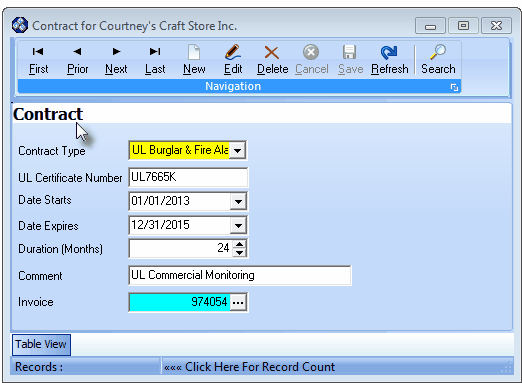
Contract (information) Form
| ▪ | The Contract Form is used to identify the information required by the Contract Length Dashboard Indicator which includes: |
| o | That Contract's Starting and Ending Dates, |
| o | The Contract's Duration (calculated automatically), |
| o | A UL® Certificate ID (if appropriate), |
| o | An Invoice Number field which identifies the initial Invoice Number created for this Contract (for when that Invoice Number was created prior to this Contract entry). |
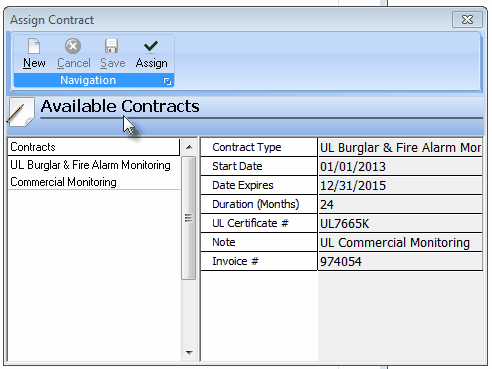
Assign Contract Form
| o | Assign the Invoice Number (and related information) of the Invoice that was created to an existing Contract record (if the appropriate Contract has already been identified), or |
| o | Create a New Contract record with that Invoice Number (and related information) included. |
| • | Once this information is provided, the Contract Length Dashboard Indicator will be able to perform the appropriate calculations. |

