|
Areas This Help File Page was last Modified on 03/31/2012 |

|

|
|
|
Areas This Help File Page was last Modified on 03/31/2012 |
|
|
Areas
This Help File Page was last Modified on 03/31/2012
|
Areas This Help File Page was last Modified on 03/31/2012 |
|
|
|
|
Areas This Help File Page was last Modified on 03/31/2012 |
|
|
| □ | In some cases, a Subscriber's Alarm System may be divided into separate Areas - sometimes these are called Partitions - and each of these Areas may be Armed and Disarmed individually, and therefore their Events must be Supervised individually, as well. |
| • | For systems with multiple Areas (or Partitions), when separately Supervised Events are desired for a specific Area, that Area must be selected in the Area/Partition field on the Events Form. |
| • | Operators may view the status of an Area within a Subscriber's system by opening a Subscriber Information Form (Press F2). |
 Then, Click the Areas Icon on the Panel Information menu bar.
| • | The Area for dialog displays the following information (which may not be changed on this Form): |
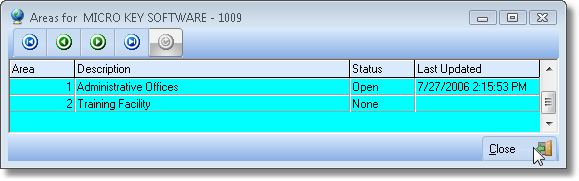
Areas display
| • | Area - The Area Number defined in the Areas Form for this Subscriber. |
| • | Description - The Description of the Area defined in the Areas Form for this Subscriber. |
| • | Status - The current Open or Closed (if supervised separately, otherwise None) Status of this Area. |
| • | Last Updated - The date and time of the last Status update. |
| • | Click the Close Icon on the Areas Form (see mouse pointer in the illustration above) to close this Form. |